Extract PDF Pages Online — Select and Download Specific Pages

Extract one or more pages from any PDF directly in the browser, without uploading anything to external servers. Specify the page range (e.g. 1-3, 5, 7-9) and download the new PDF in seconds. Free, private, no installation required.

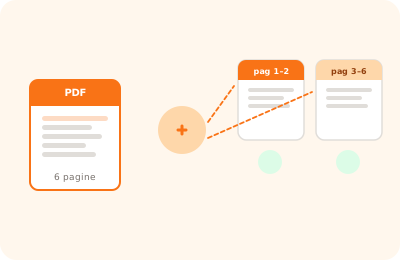
Split PDF tool illustration: PDF document separating into multiple distinct files

Drag the PDF to extract pages from here

or drag the file here

100% private
Instant
Free

or open the full PDF editor for annotations, signatures and much more.

How it works

Upload your PDF

Drag the file into the area above or click to select it. The document stays on your device.

Specify the pages

Type the page range to extract: for example "1-3, 5" will extract pages 1, 2, 3 and 5.

Download the new PDF

Click "Extract pages" and the PDF with only the selected pages is downloaded instantly.

Why OnlinePdfEditor

100% Private

Everything runs in the browser via WebAssembly. Your PDF is never sent to any server.

Instant

No upload, no queue. Processing is local and completes in seconds even for large files.

Free, no tricks

No required account, no credit card, no watermark. Truly free.

Works everywhere

PC, Mac, iPhone, Android — just a modern browser. Safari, Chrome, Firefox or Edge.

Extracting pages from a PDF means selecting a subset of pages and creating a new document with only those selected. It is useful for isolating chapters, separating sections of a report, or creating extracts from long documents.

OnlinePdfEditor lets you select pages individually or by range, displaying thumbnails of each page to make selection easier. The new PDF is created and downloaded directly in the browser, without passing through external servers.

The extracted document maintains the original quality of the pages: images, fonts and layout remain identical to the source document.

Frequently asked questions

How do I write the page range to extract?

You can use intervals like "1-3" for consecutive pages, or individual pages separated by commas like "2, 5, 8". You can also combine them: "1-3, 5, 7-9".

Is the original PDF modified?

No. The tool creates a new PDF with the selected pages, leaving the original file intact on your device.

Are my files uploaded to a server?

No. OnlinePdfEditor processes PDFs entirely in the browser via WebAssembly. The file never leaves your device.

Can I extract pages from password-protected PDFs?

Yes, but you will need to unlock the document first with the password. The extracted PDF will not keep the original protection.

Is there a limit to how many pages I can extract?

No, you can extract any number of pages as long as the original PDF is within the 50 MB limit (free) or unlimited with the Pro plan.

Does it work on mobile and tablet?

Yes. It works on any device with a modern browser — iPhone, Android, iPad — without installing any app.

Ready to start?

Free, in the browser, nothing to install. Upload your PDF and go.

This site uses technical cookies and Google Analytics to improve your experience. & .