OCR PDF Online Free — Recognise Text from Scanned PDF

Extract and recognise text from scanned PDFs or images using OCR directly in the browser. Transform non-searchable documents into PDFs with selectable, copyable text. Free, private, no server upload.

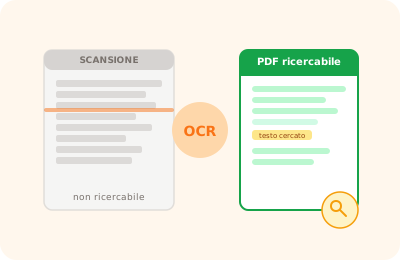
OCR PDF illustration: scanned PDF document with recognized text highlighted

Drag your scanned PDF here

or drag the file here

100% private
Instant
Free

or open the full PDF editor for annotations, signatures and much more.

How it works

Upload the scanned PDF

Drag the scanned PDF or image. The file is processed locally in your browser.

Run OCR

The OCR engine analyses every page and recognises text in Italian, English and many other languages.

Download or copy text

Copy the recognised text or download the PDF with the text layer overlaid to make it searchable.

Why OnlinePdfEditor

100% Private

Everything runs in the browser via WebAssembly. Your PDF is never sent to any server.

Instant

No upload, no queue. Processing is local and completes in seconds even for large files.

Free, no tricks

No required account, no credit card, no watermark. Truly free.

Works everywhere

PC, Mac, iPhone, Android — just a modern browser. Safari, Chrome, Firefox or Edge.

OCR (Optical Character Recognition) converts images of text present in a scanned PDF into selectable and searchable text. After OCR, you can select, copy and search text in the document as if it were a native PDF with text.

OnlinePdfEditor uses Tesseract.js, one of the most advanced open-source OCR engines, to recognise text in Italian, English and numerous other languages. The process happens entirely in the browser via WebAssembly — no files are transmitted to external servers.

OCR is particularly useful for scanned historical documents, invoices in image format, and any PDF that does not allow text selection.

Frequently asked questions

What is OCR?

OCR (Optical Character Recognition) is a technology that recognises text in images. It converts scanned documents or photos of text into editable digital text.

What languages does the OCR support?

The Tesseract.js engine used by OnlinePdfEditor supports over 100 languages, including Italian, English, French, German, Spanish, Portuguese and many more.

Does it work with low-quality PDFs?

Accuracy depends on scan quality. Sharp, high-resolution documents (at least 300 DPI) give excellent results. Blurry or skewed scans may give partial results.

Are my files uploaded to a server?

No. OCR happens entirely in the browser via Tesseract.js (WebAssembly). The file never leaves your device.

Can I run OCR on a single page?

Yes. You can select the specific page to run OCR on without processing the entire document.

Does it work with JPEG or PNG images instead of PDFs?

Yes. You can upload a JPEG, PNG or TIFF image directly and get the recognised text.

Ready to start?

Free, in the browser, nothing to install. Upload your PDF and go.

This site uses technical cookies and Google Analytics to improve your experience. & .